







lumabar
Windows 11 Taskbar Replacement with Live Widgets
The story
Overview
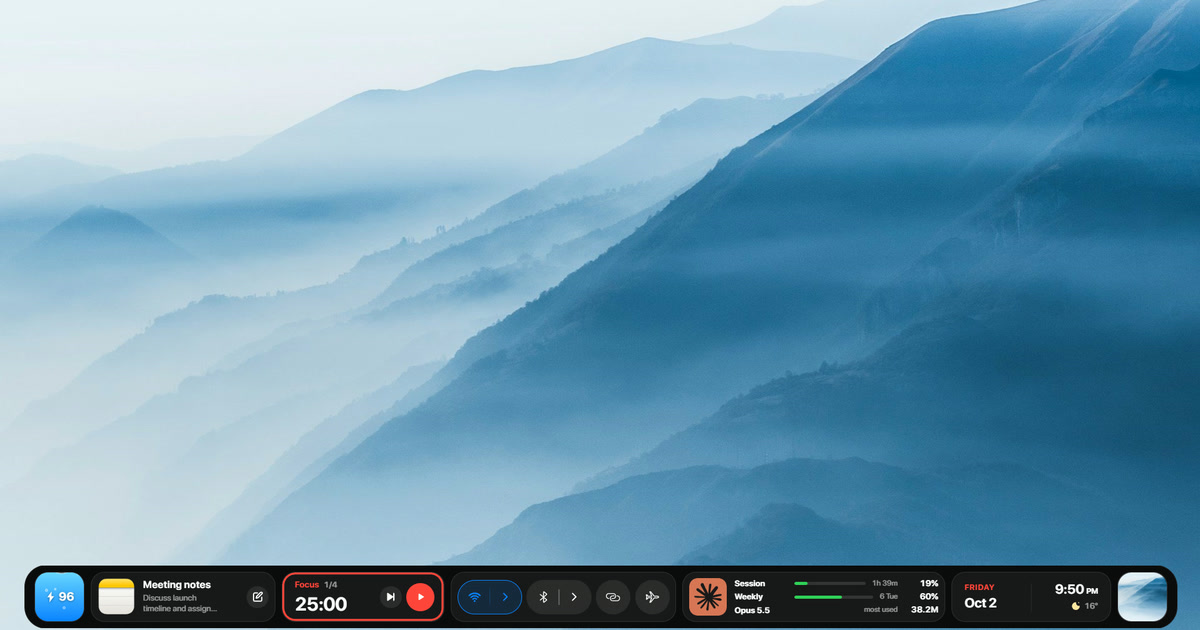
lumabar is a desktop utility that replaces the Windows taskbar with a customizable widget dock for Windows 10 and 11. It provides quick access to 85 different widgets covering productivity, system information, entertainment, and third-party service integrations without requiring users to open separate applications. The dock can be positioned at the top or bottom of the screen and displays pinned apps, open windows, and live data from services like weather, calendar, music players, and AI tools. Designed for users who want a more efficient desktop experience, lumabar operates entirely locally with no accounts, servers, or data collection, ensuring privacy while offering lifetime access through a one-time purchase.
Key features
85 Customizable Widgets
Access a wide range of widgets including music controls, calendar, weather, system stats, and third-party integrations like Claude and ChatGPT limits.
Top or Bottom Positioning
Drag the dock to position it at the top or bottom edge of your screen with panels that open in the appropriate direction.
App and Window Management
Display pinned apps from your Windows taskbar, open windows, and quick access to Downloads, Screenshots, Recent files, and Recycle Bin.
Privacy-First Design
No accounts, no servers, and no telemetry - all your layout, todos, and notes stay on your PC with only essential license checks going online.
Free Lifetime Updates
Every feature and new widget added to lumabar is included free with your one-time purchase, with no subscription required.
14-Day Money-Back Guarantee
Risk-free purchase with a full refund available if lumabar isn't right for you within 14 days.
Use cases
- 1
Power Users
Reduce app-switching by accessing frequently-checked information like weather, calendar, and system stats directly from your dock.
- 2
Productivity Enthusiasts
Organize your desktop with a customizable widget dock that keeps your most-used tools and information visible at all times.
- 3
Privacy-Conscious Users
Use a desktop enhancement tool that respects your privacy with no telemetry, no accounts, and all personal data stored locally.
- 4
macOS Switchers
Recreate a dock-like experience on Windows 11 and 10 with a modern glass effect and top-bar positioning similar to macOS.
FAQ
How much does lumabar cost and is there a subscription?
lumabar costs $5.99 as a one-time payment for a lifetime license with all updates included. There is no subscription required.
Can I get a refund?
Yes, lumabar comes with a 14-day money-back guarantee. Email hello@lumabar.xyz from the address you purchased with and receive a full refund through Polar with no questions asked.
Will lumabar run on my PC?
lumabar runs on Windows 11 and Windows 10 in both 64-bit and 32-bit versions. If your PC runs either operating system, it will work.
What happens to my Windows taskbar?
While lumabar is open, it sets the Windows taskbar to auto-hide or hides it completely based on your preference. Closing lumabar restores the taskbar to its original state without any permanent modifications.
What data does lumabar collect?
lumabar collects no data and has no telemetry. Your layout, todos, and notes stay on your PC. Only license checks and individual widget services go online, with nothing collected by lumabar itself.
Tech stack & tags
Feedback & Discussion
Discussion
Sign in to leave a comment or rating.
No comments yet. Be the first.
More Productivity tools

Turn your own videos and photos into a living desktop
Instant online coin toss for heads or tails decisions



Collaborative presentation software for modern teams.